
Commissioning
Up to twelve devices at the same time. The run resets them where necessary, provisions them and sets keys, links, device type groups and room groups. With Ultra, it also flashes firmware from your package.
Supported devices
Mesh Service supports all 20 JUNG HOME device types, including push-buttons, sockets, mini actuators, detectors and room thermostats. A run commissions up to twelve devices at the same time, sets them up the way the JUNG HOME App does and writes the project file that the app imports.
Mesh Service is a product of Appenetic. JUNG and JUNG HOME are trademarks of ALBRECHT JUNG GMBH & CO. KG and are mentioned here to describe the supported devices.
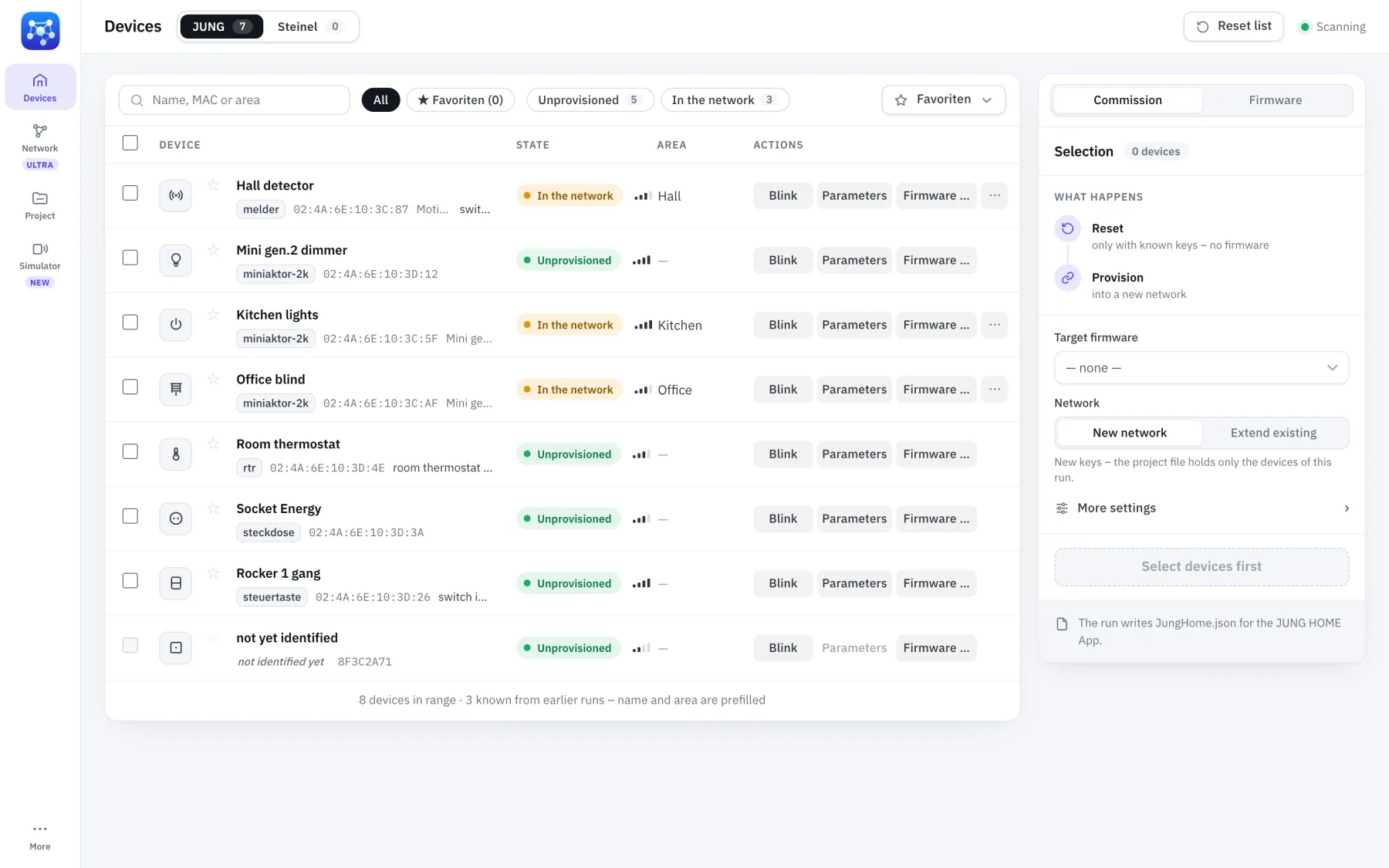
Up to twelve devices at the same time. The run resets them where necessary, provisions them and sets keys, links, device type groups and room groups. With Ultra, it also flashes firmware from your package.
With the keys of the network by Config Node Reset, as in the JUNG HOME App. Mesh Service reaches devices with the proxy switched off through another device of the same network.
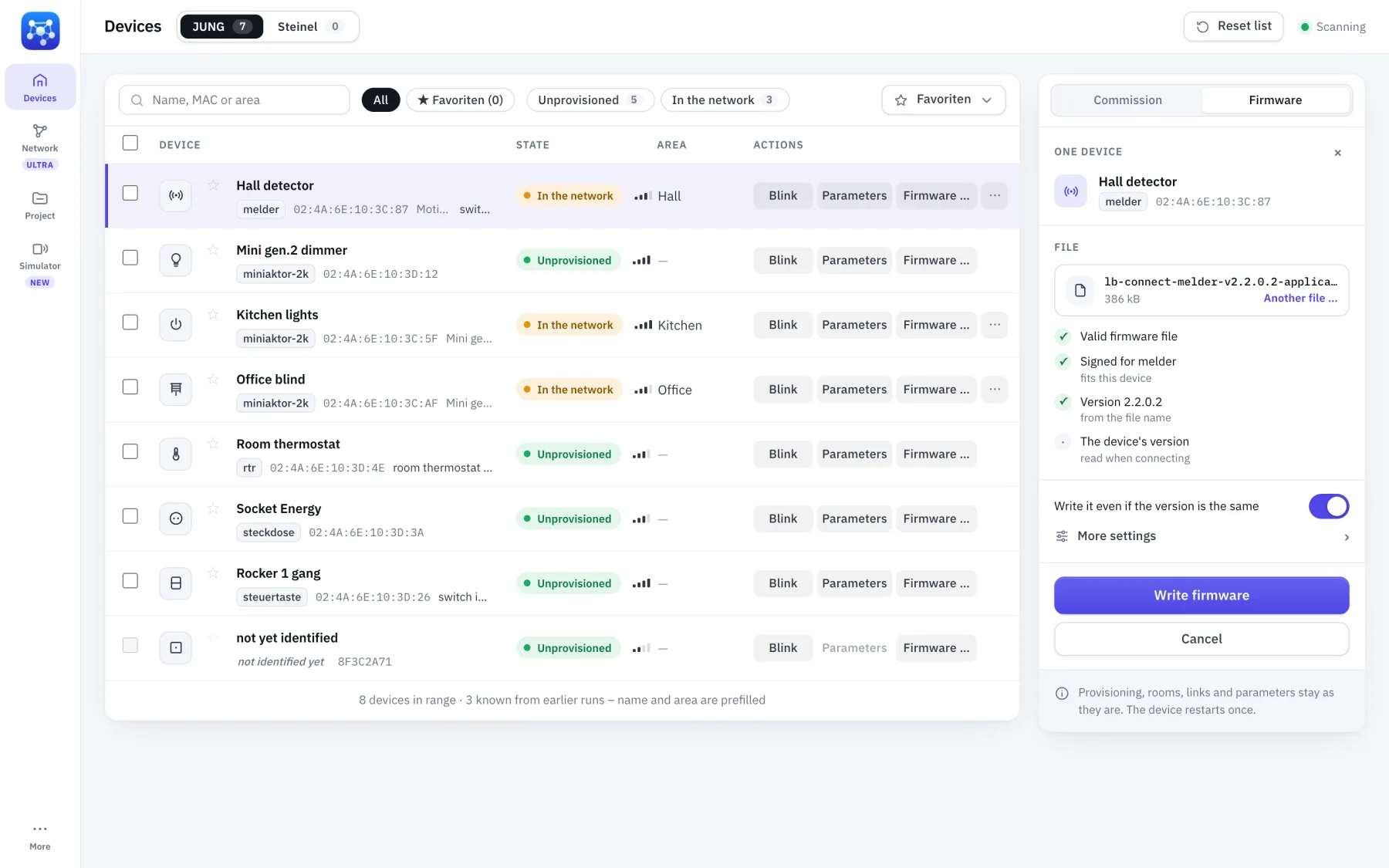
Files signed by JUNG onto one device (Pro) or as a package for many devices (Ultra). Each file is checked against the firmware group of the device.
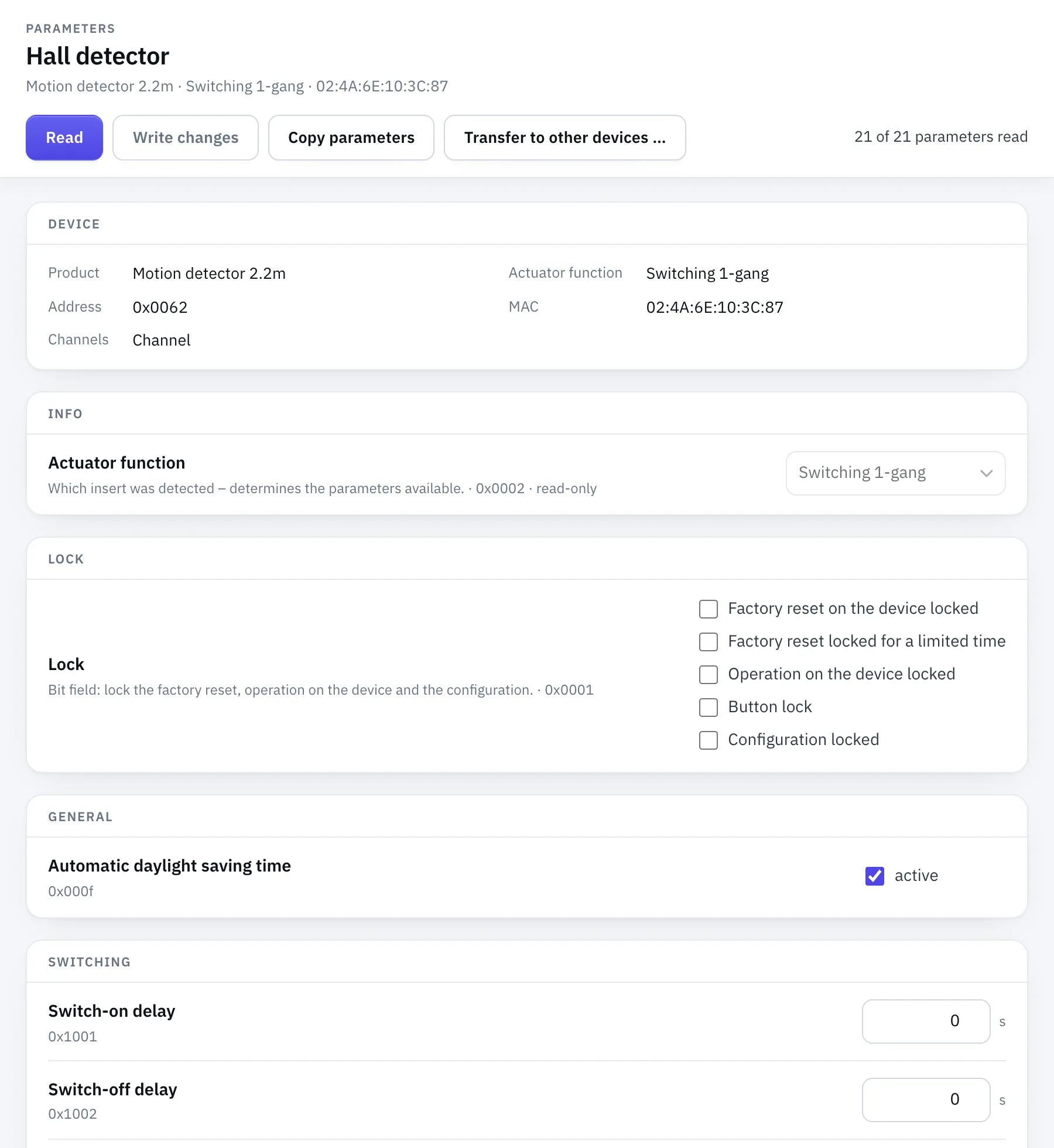
The same settings, limits and units as in the JUNG HOME App. With Ultra, values can be transferred to devices of the same type.
A PDF for the handover with every device, its address, area, firmware and result. It contains no keys.
Capture, network map and an Optimization view that corresponds to the “Project optimization” of the app. The simulator knows all 20 device types.
Mesh Service does not replace the JUNG HOME App. A run ends with the JungHome.json that the app imports. In the other direction, Mesh Service reads the export of the app and so knows the keys of an existing installation.
Export the project in the JUNG HOME App under “My project” › “Export” and load the file in Mesh Service with “Load project …”. Mesh Service can then reset the devices of this installation over the mesh, make them blink, configure them and analyse the network.
A device accepts only one Bluetooth connection at a time. Before a run, switch off Bluetooth on the phone and switch off the JUNG HOME gateway so that Mesh Service can reach the devices.
Mesh Service knows 20 JUNG HOME device types. Except for the gateway, each belongs to one of nine firmware groups. The group determines which file of a firmware package a device receives. For push-buttons, detectors and the room thermostat, the device list also shows the insert, for example “switch insert 1-gang”, before anyone has connected to the device.
| Devices | Firmware group | Products in the catalogue (product ID) |
|---|---|---|
| Push-buttons, 1-gang and 2-gang | steuertaste | Rocker 1 gang (1), Rocker 2 gang (2) |
| Sockets, including Energy | steckdose | Socket Energy (3), Socket (12) |
| Mini actuators, 1st generation | miniaktor | Mini gen.1 (4), Mini gen.1 blinds (13) |
| Battery push-buttons | wandsender | Rocker battery 1 gang (5), Rocker battery 2 gang (6) |
| Motion and presence detectors | melder | Motion detector 1.1m (7), Motion detector 2.2m (8), Presence detector (9) |
| Room thermostat | rtr | Room thermostat (10) |
| Mini actuators, 2nd generation (Energy, 2-channel, dimmer, BA, DALI) | miniaktor-2k | Mini gen.2 energy (16), 2ch (17), dimmer (18), BA (19), DALI (20) |
| Binary input, 230 V | bin2f-230 | Mini gen.2 input 230V (21) |
| Binary input, battery | bin2f-batt | Mini gen.2 input battery (22) |
| Gateway | – | Gateway (11) |
The gateway has no firmware group. Mesh Service does not flash firmware onto it.
A device that has been in a network must be reset before it can be added again. A firmware update alone does not reset the mesh configuration. If the keys of the network are known, Mesh Service sends the device a Config Node Reset over the mesh. The JUNG HOME App does the same. This takes a few seconds, and the firmware stays unchanged.

Mesh Service comes with no firmware. You bring files signed by JUNG yourself. Before flashing, Mesh Service checks the signature of every file and whether it fits the firmware group of the device. Whether a device already has a version is decided by the version number the device reports. The run skips devices that are already up to date.
The parameter window shows the same settings as the JUNG HOME App, with the same limits, steps and units. The groups are switching, dimming, blind, input, control, display, detector, status LED with colours and night mode, and lock.
No. Mesh Service commissions devices, configures them and analyses the network. You continue to operate the installation with the JUNG HOME App. The project file JungHome.json connects the two.
After the run, you save the file with “Save JungHome.json …” and import it in the JUNG HOME App under “My project” › “Import”.
Export the project in the JUNG HOME App under “My project” › “Export” and load it in Mesh Service with “Load project …”. Mesh Service then knows the keys of the installation and can reset devices, make them blink, configure them and analyse the network.
With the keys of its network, over the mesh. In the row of the device, use “⋯” › “Reset …”, or let a run do it automatically. This takes a few seconds, the firmware is kept, and a device with the proxy switched off can be reached as well. Without the keys, you reset the device with its reset button.
Yes, with files signed by JUNG that you bring yourself. With Pro, you flash one file onto one device, with Ultra firmware packages onto many devices. In the “Firmware” mode, everything that is set up is kept.
All 20 device types. These are push-buttons, battery push-buttons, sockets, mini actuators of the first and second generation, binary inputs, motion and presence detectors, room thermostats and the gateway.
Download the program and request the licence from within it. If you have questions, write to us.