Mesh Service is a program for Mac and Windows PC. It commissions JUNG HOME and Steinel devices, up to twelve at the same time, configures them and records the radio traffic of the installation.
You tick the devices in the list and start the run. Mesh Service resets the devices where necessary, adds them to the network and sets them up the way the manufacturer’s app does. With an Ultra licence, the run also flashes firmware from a firmware package onto JUNG devices. Afterwards, you save the project file for the app and, if required, a report for the customer.
Finding devices
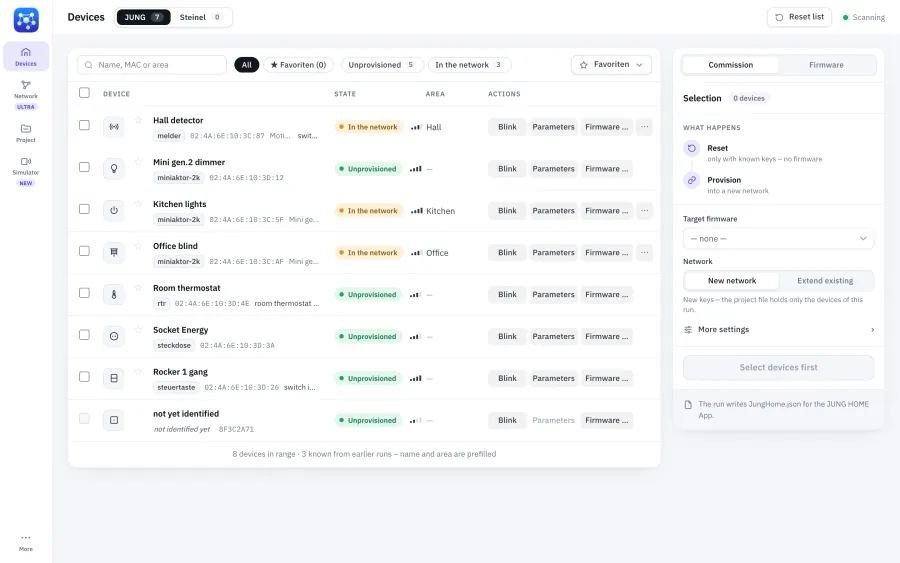
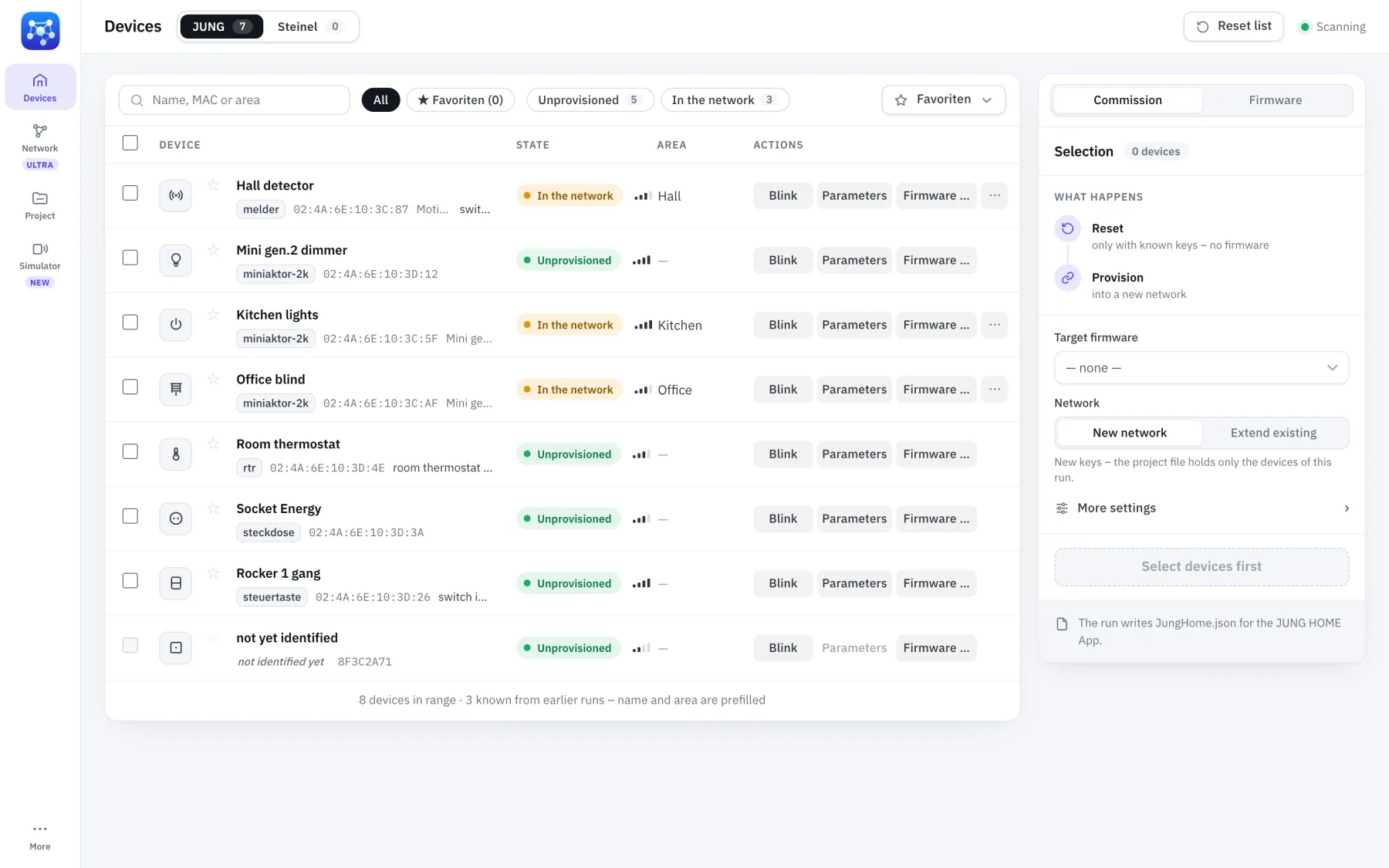
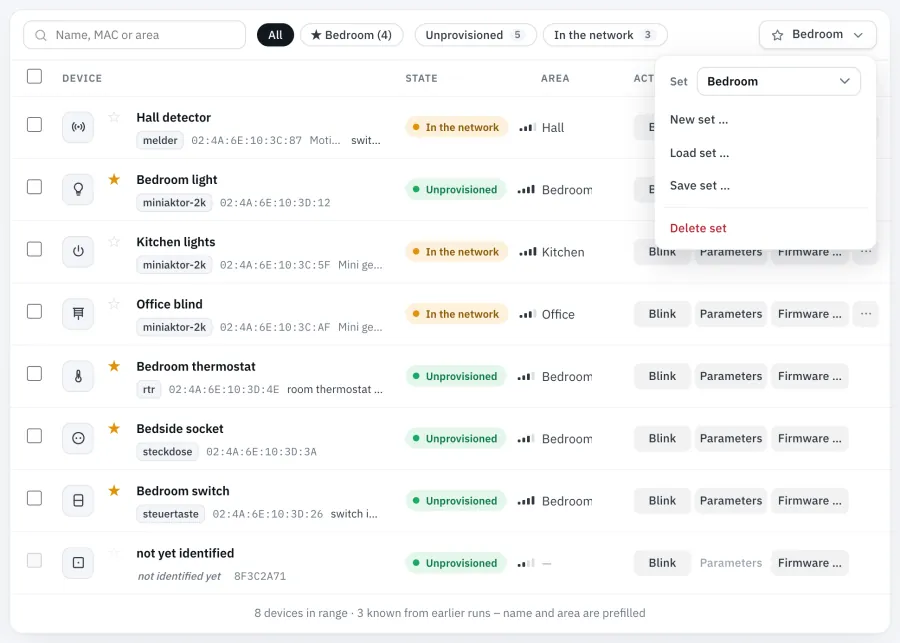
Mesh Service scans continuously for devices within radio range. The list shows whether a device is unprovisioned or already belongs to a network, along with signal strength and device type. For push-buttons, detectors and room thermostats, it also shows the insert the cover sits on. “Blink” shows which device belongs to which row.
Pro
Setting up the run
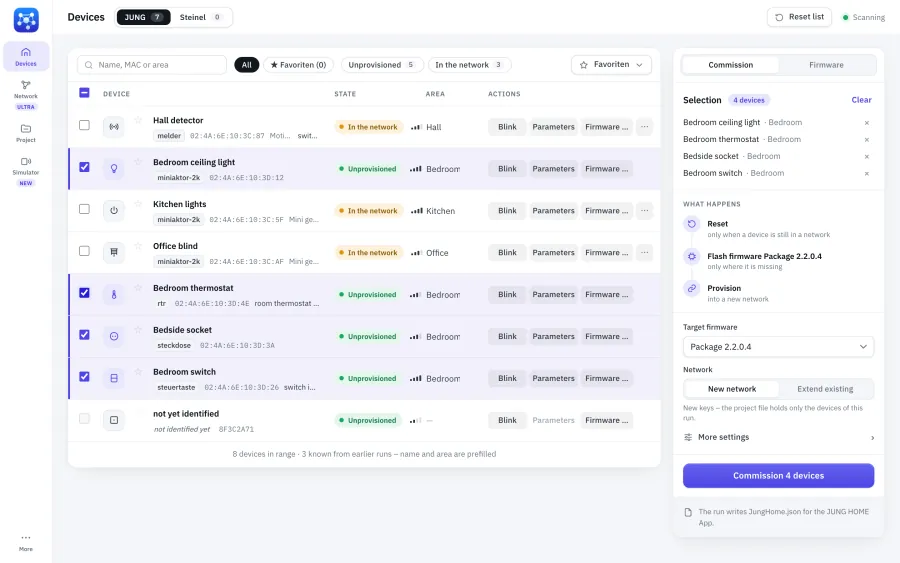
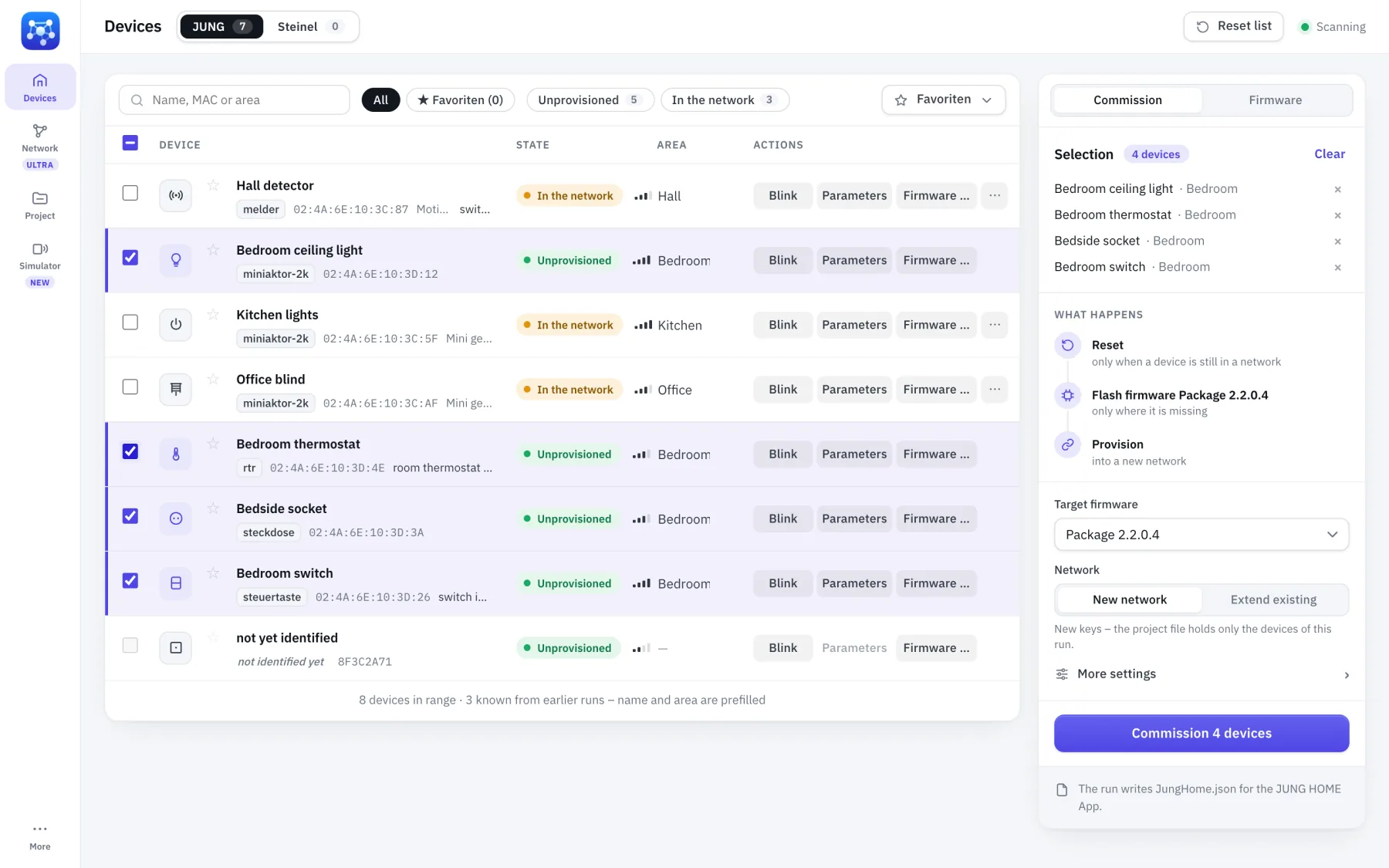
Tick the devices and give them names and areas. For JUNG HOME, the run writes the area onto the device as a room group. You choose whether the run creates a new network or extends an existing one. With an Ultra licence, you also choose the firmware from a firmware package.
ProFirmware in the run with Ultra
The run
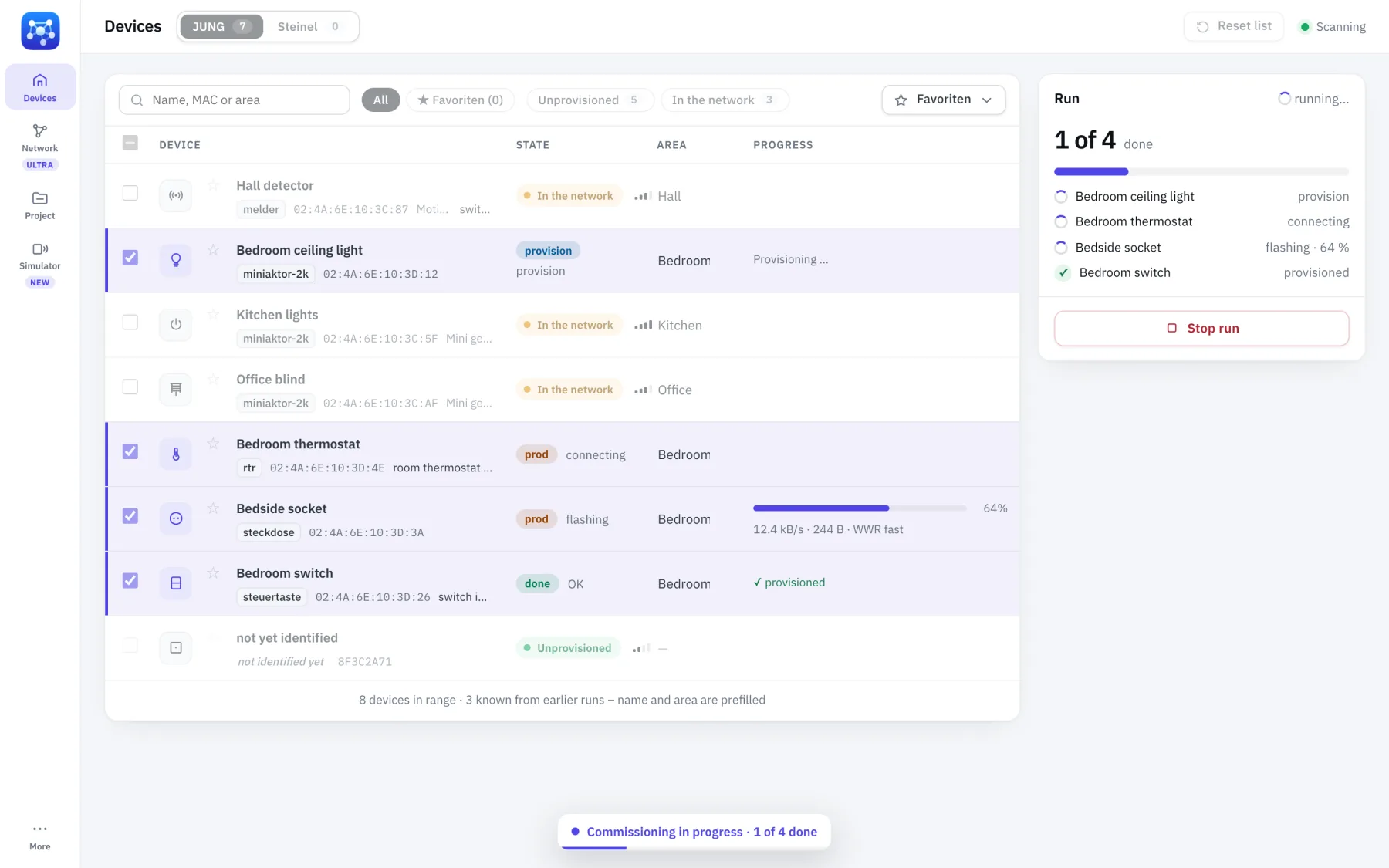
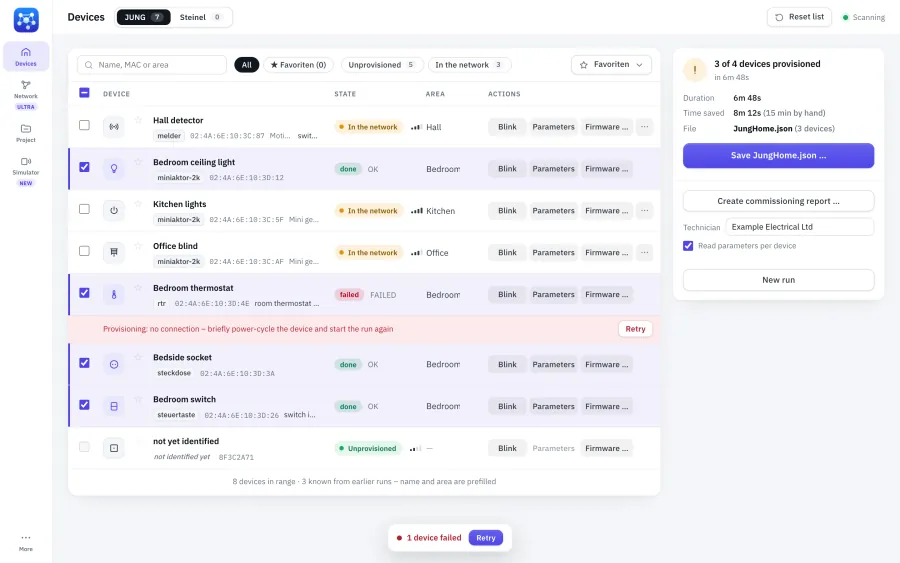
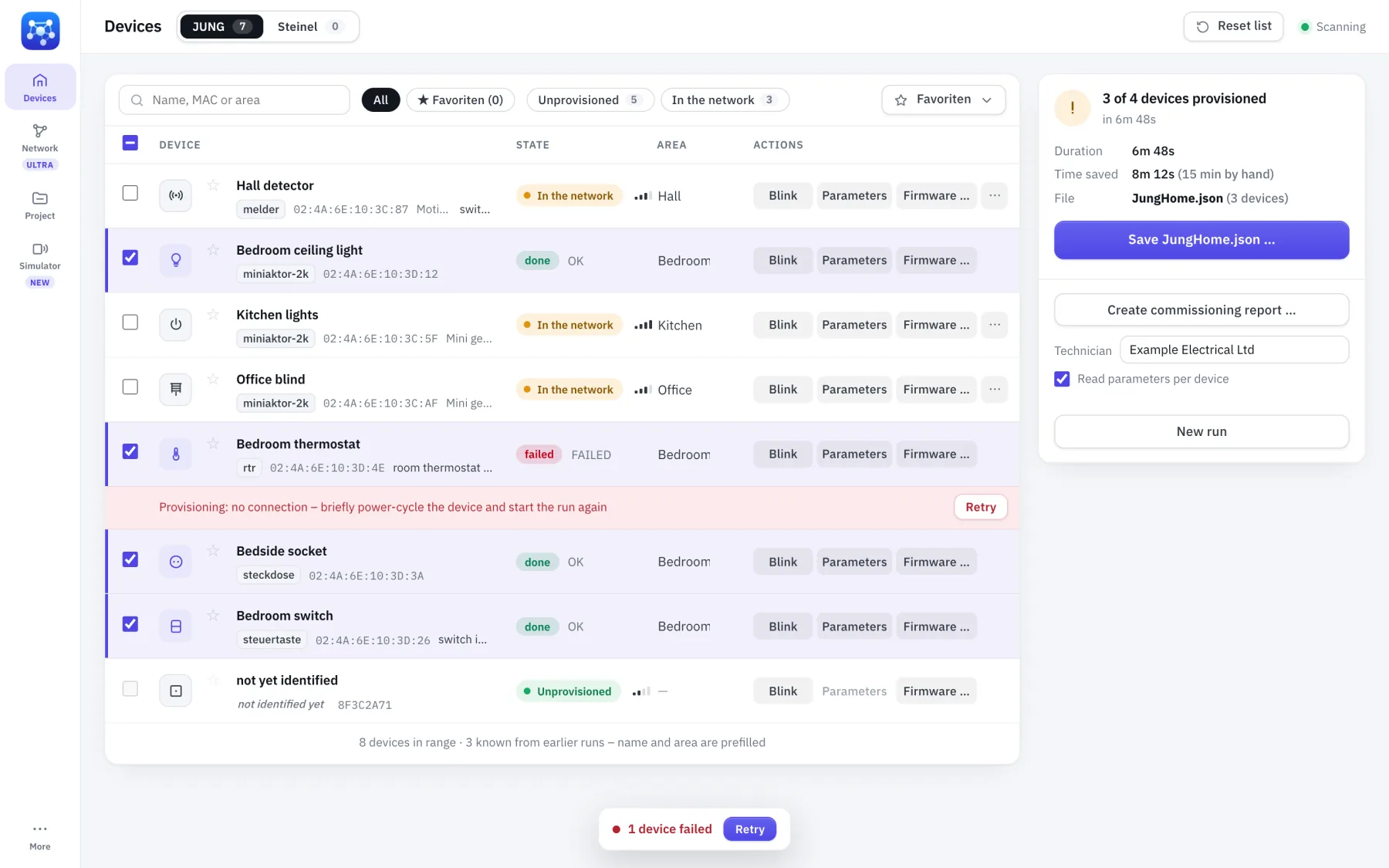
A run works on up to twelve devices at the same time. It resets devices from another network over the mesh. If a firmware package is chosen, it flashes the firmware onto JUNG devices. It then provisions the devices and sets up keys, links and groups. Each row shows the phase its device is in. If a device fails, its row gives the reason, for example “briefly power-cycle the device”, and one click retries it.
Pro
Handover
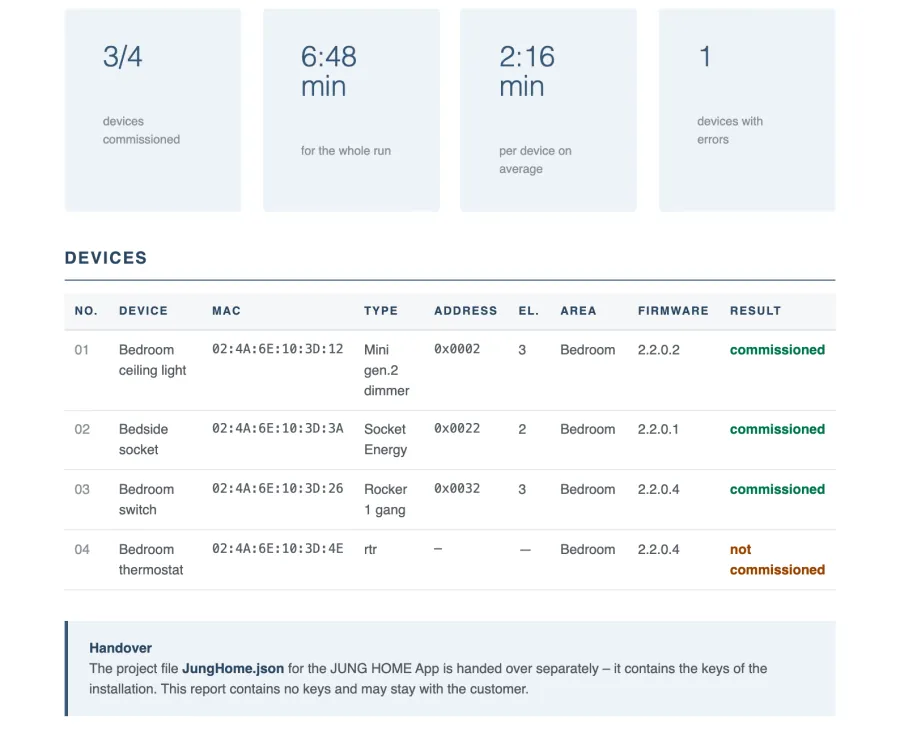
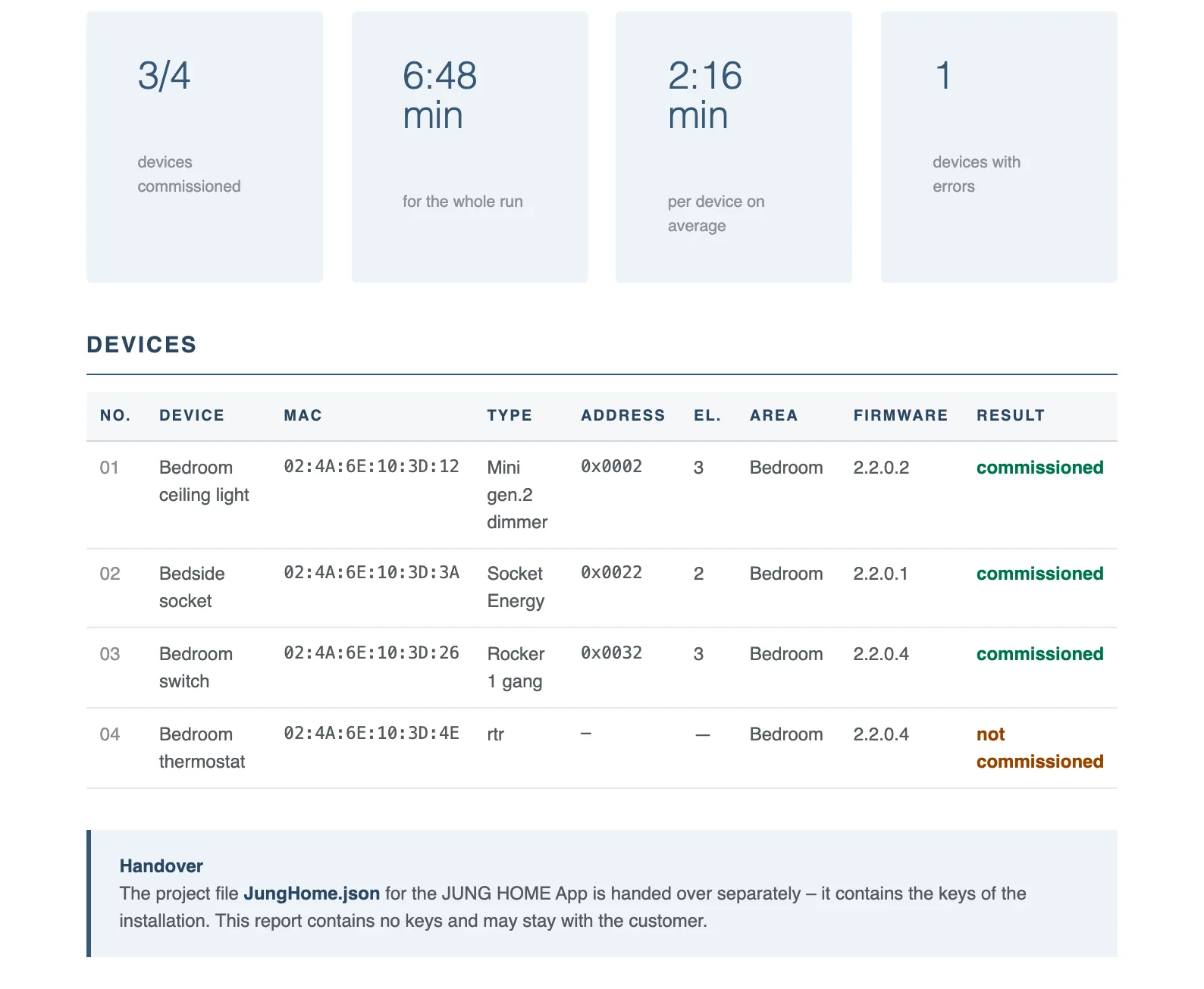
After the run, you save the project file, JungHome.json for the JUNG HOME App or Steinel.json for the Steinel Connect App. The commissioning report as a PDF lists every device with its address, area, firmware and result, and on request with its parameters. It contains no keys, so it can stay with the customer.
Pro
Mesh Service · Devices
Mesh Service · Setting up the run
Mesh Service · Result
Features
Features that need an Ultra licence are marked. All others are included with Pro.
Pro
Parameters
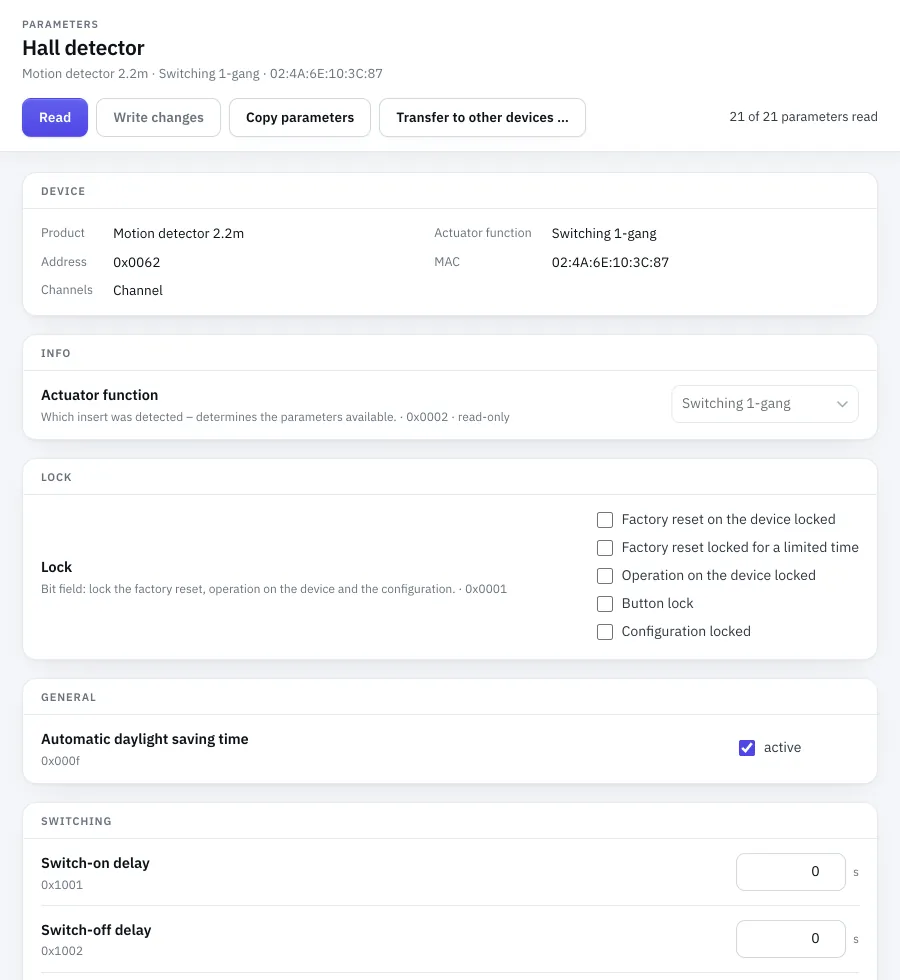
For JUNG HOME, the parameter window shows the same settings as the app, with the same limits and units. These include switching, dimming, blinds, control, detectors, status LED and night mode, and locks. For Steinel devices, it shows the Bluetooth SIG standard models and the manufacturer’s properties. Mesh Service writes only changed values, and the device confirms each one.
Ultra Copy parameters and transfer them to several devices of the same type. Each device confirms its values individually.
Pro
Blinking
An unprovisioned device blinks its status LED for 15 seconds. On a device in a network, each relay toggles audibly twenty times and then returns to its previous state. Steinel devices blink even without the keys of their network.
Pro
Resetting
If the keys of the network are known, Mesh Service resets a device over the mesh. This takes a few seconds and also works when the reset button is behind the cover. The program reaches devices with the proxy switched off through another device in the same network. It resets Steinel devices to factory settings without keys.
Pro
Commissioning report
The report for the handover contains the date, the technician, the network, the key figures of the run and every device with its address, area, firmware and result. On request, Mesh Service first reads the parameters of every device and includes them. It contains no keys.
Pro
Device sets and favourites
The star marks single devices, and a set holds the devices of one site with their names and rooms. A click on the set ticks its devices for the next run. Sets refer to MAC addresses and therefore work on any computer.
Pro
Your own firmware
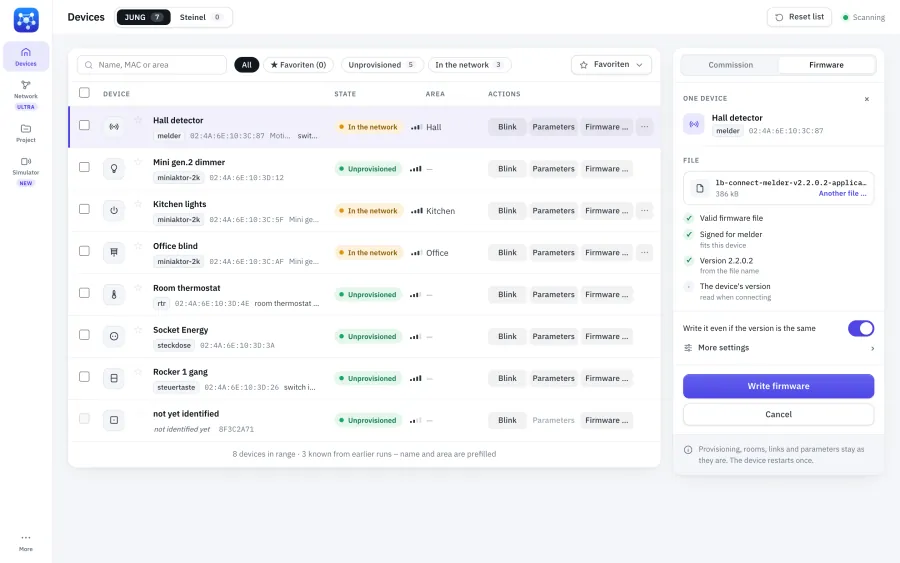
“Firmware …” flashes a .gbl file signed by JUNG onto a device. Mesh Service first checks the signature and whether the file fits the firmware group of the device. Afterwards, it reads back the version. Provisioning, rooms, links and parameters are kept.
Ultra
Firmware packages
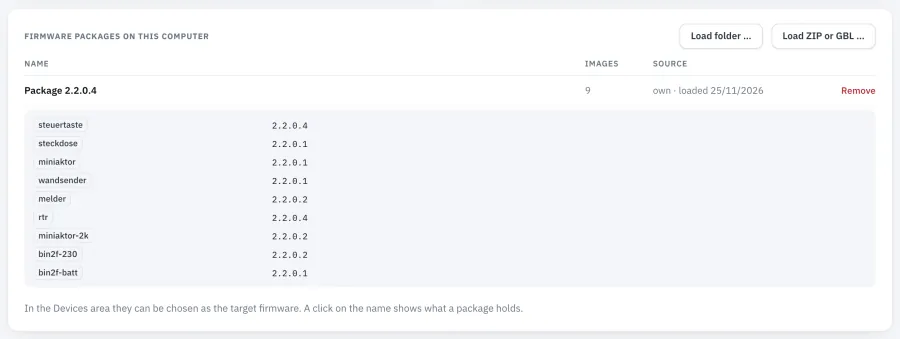
You load a firmware package as a folder or ZIP file. Mesh Service checks every file and shows the version per device group. A run then flashes the firmware during commissioning. In the “Firmware” mode, it updates only the firmware and leaves everything that is set up unchanged. It skips devices that are already up to date.
Pro
Loading projects
“Load project …” opens the export from the JUNG HOME App, a Steinel.json or a key store of Mesh Service. The program then knows the keys of the installation and can reset its devices, make them blink, configure them and analyse them. The devices of the project are ticked straight away.
An overview of the project files on this computer
“Start over …” backs up the keys first
All editions
Updates
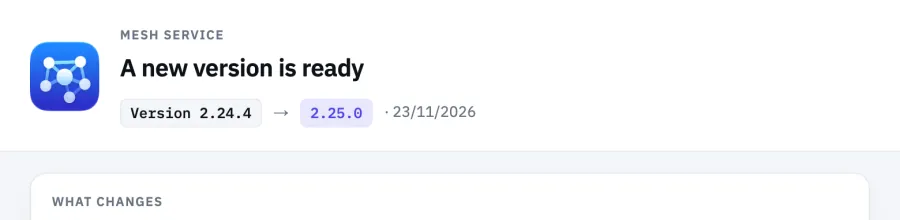
Mesh Service reports new versions and shows what has changed. One click installs the update. The program installs only packages signed by the publisher.
All editions
Language and appearance
The interface, the messages and the report are available in English and German. The appearance is light, dark or follows the system. Each version comes with the manual as a PDF in both languages.
Pro
Command line
Called with arguments, the same program works on the command line. It scans for devices, flashes firmware, provisions, reads and writes parameters and captures the radio traffic. There is a dry run (--dry-run), JSON output and exit codes for scripts. The device sets are the same as in the interface. Capture and simulator need Ultra.
# mesh stands for the program call, for example as an alias$ mesh scan
$ mesh onboard --set sets/living-room.json --mode provision
$ mesh params --mac 60:B6:47:D7:AE:C4 --set switchOnDelay=1.5
$ mesh sniff --dongle --seconds 60 --pcap
Ultra licence
Network analysis
Mesh Service records the radio traffic of an installation and decrypts it with the keys of the project. Six views evaluate the capture. The findings describe in sentences what stands out, what shows it and what you can do.
Capture
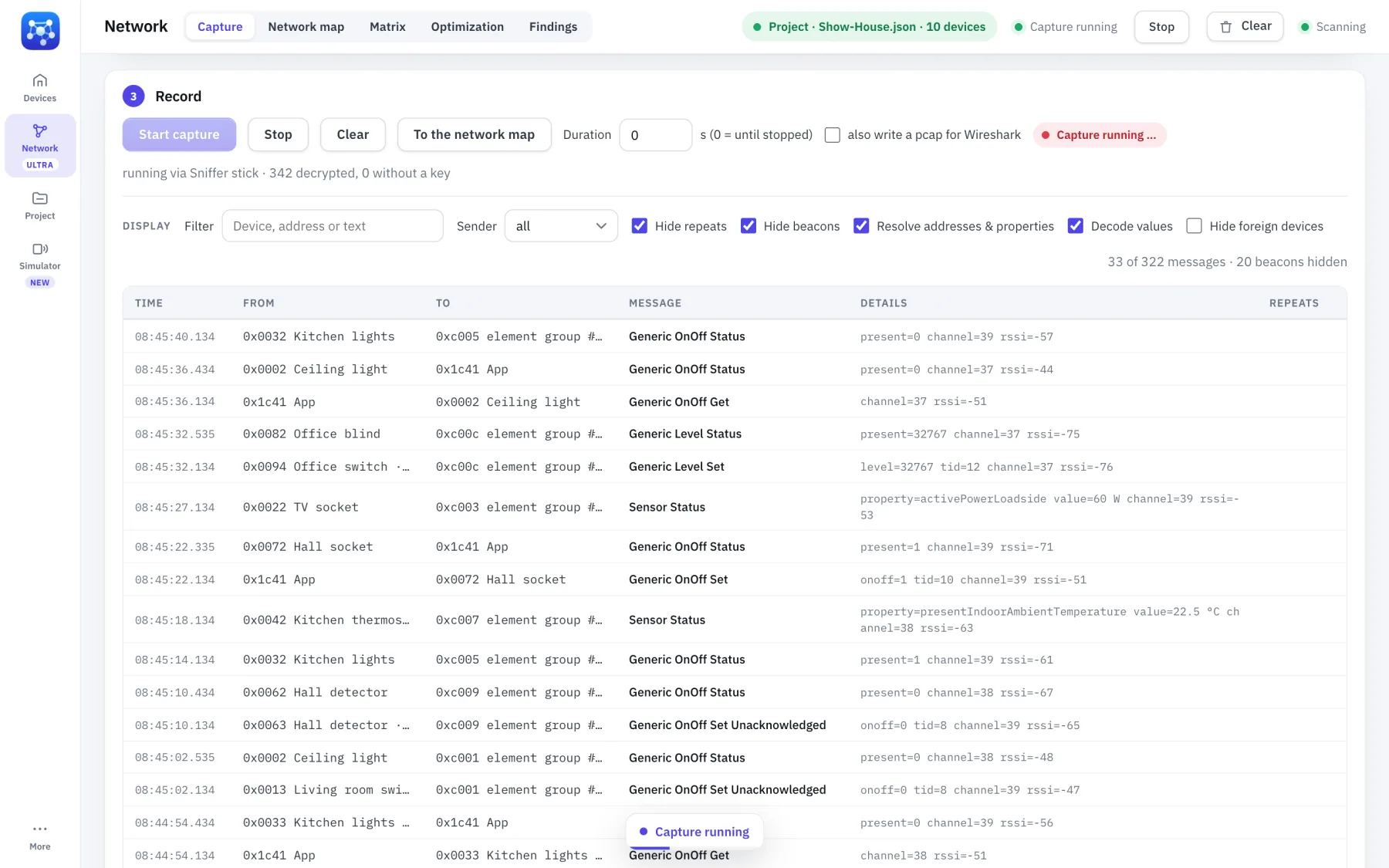
The table shows every message with sender, receiver and content, such as button presses, status messages, sensor values with their unit and configuration by the app. Mesh Service listens in through a device in the network or through a sniffer stick that receives all radio traffic.
Filters for sender, repeats, beacons and foreign devices
Export as JSON Lines and as pcap for Wireshark
Up to 20,000 messages in memory
Network map
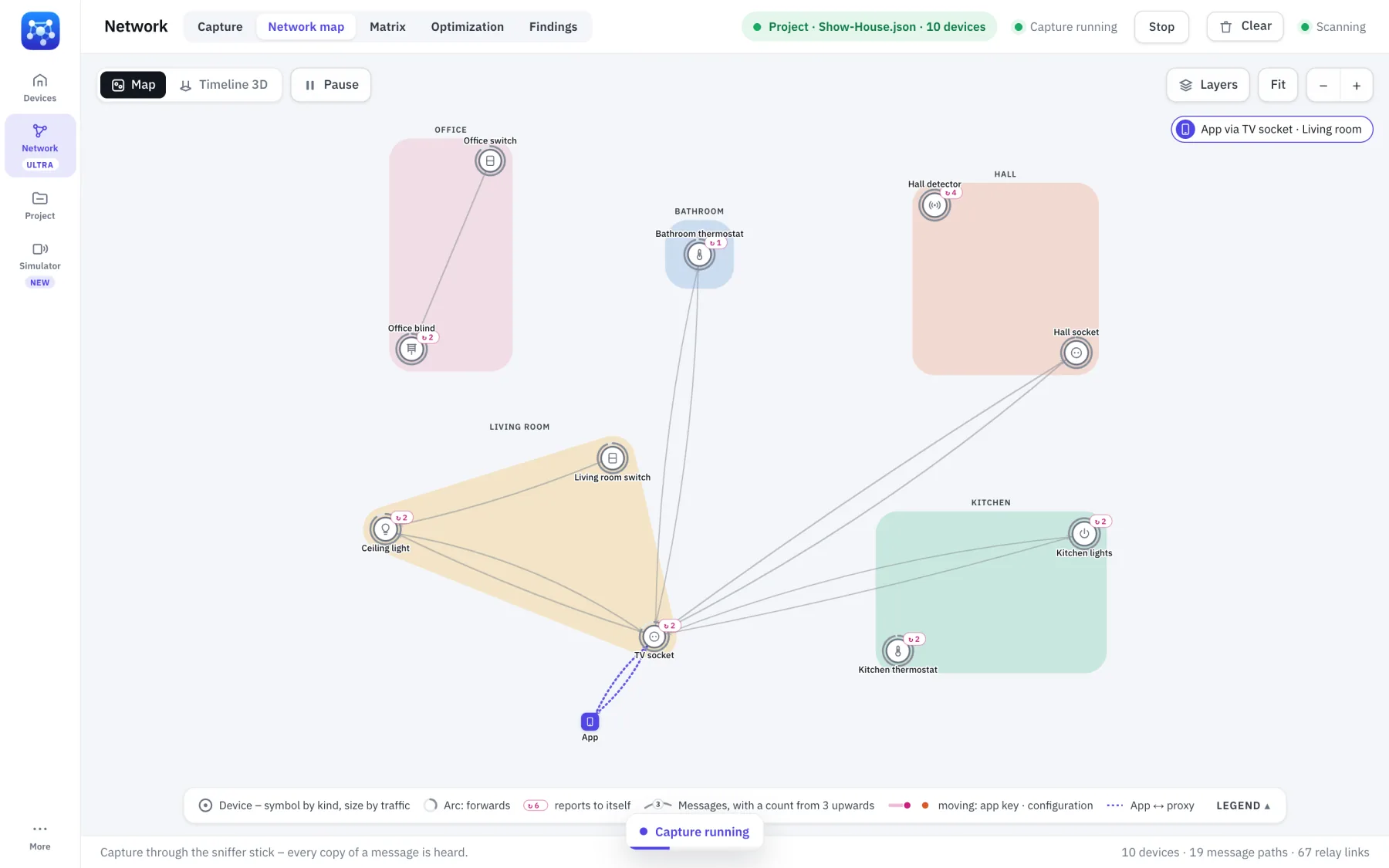
The map shows the devices arranged by room, lines for the message paths and pulses for the running traffic. The app appears at the device through which it is connected. The map adopts group changes made in the app during the capture.
Arrangement by rooms or by forwarding neighbourhood
Forwarding as arcs around the devices (with the sniffer stick)
Side panel with counters and access to the parameters
Timeline 3D
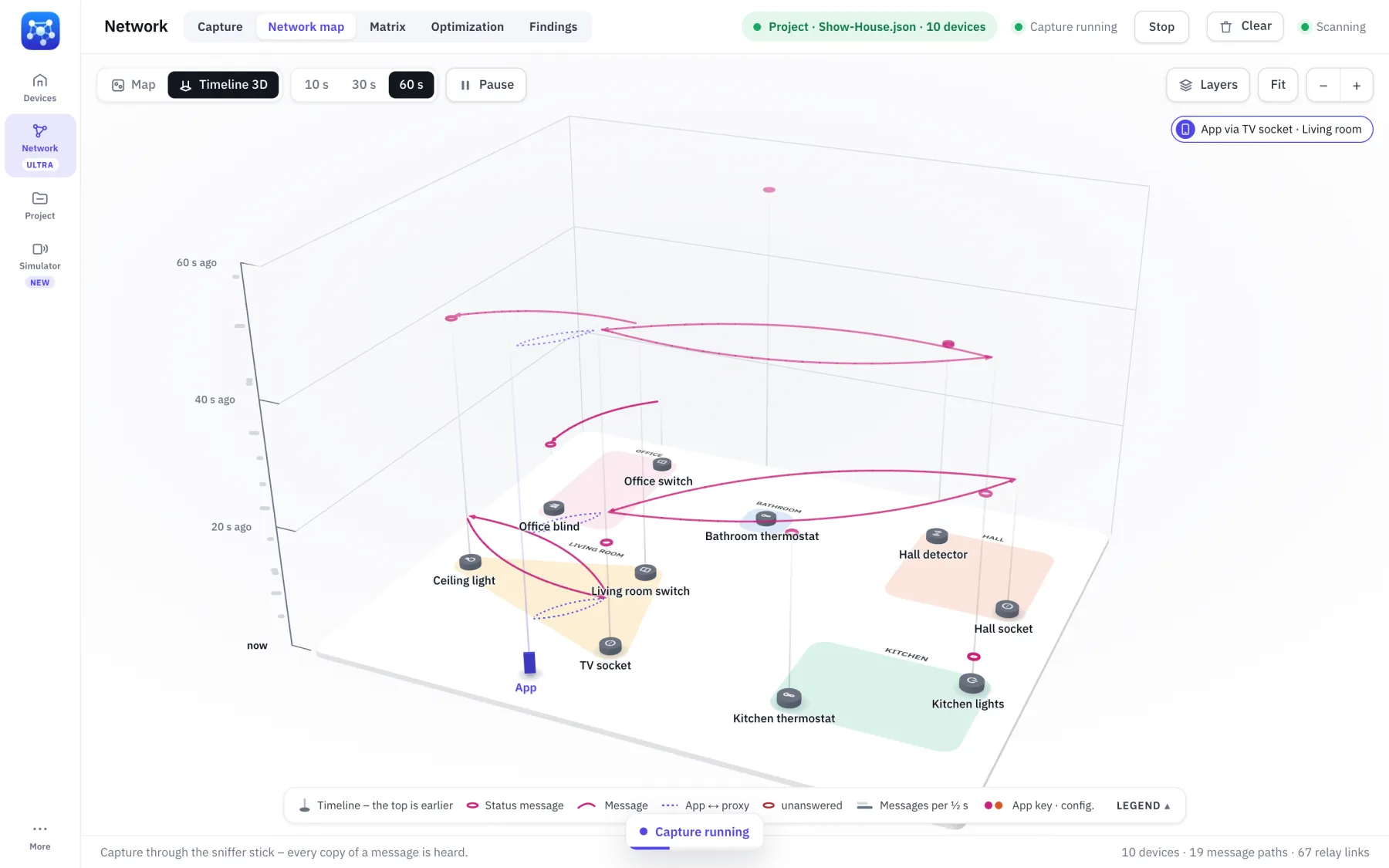
Timeline 3D tilts the map and turns time into height. Status messages appear as rings, messages between devices as arcs. A request without an answer is marked in red. A click on a message shows which devices it passed through.
Time window of 10, 30 or 60 seconds
Time resolution of 0.1 seconds
Needs WebGL 2
Matrix
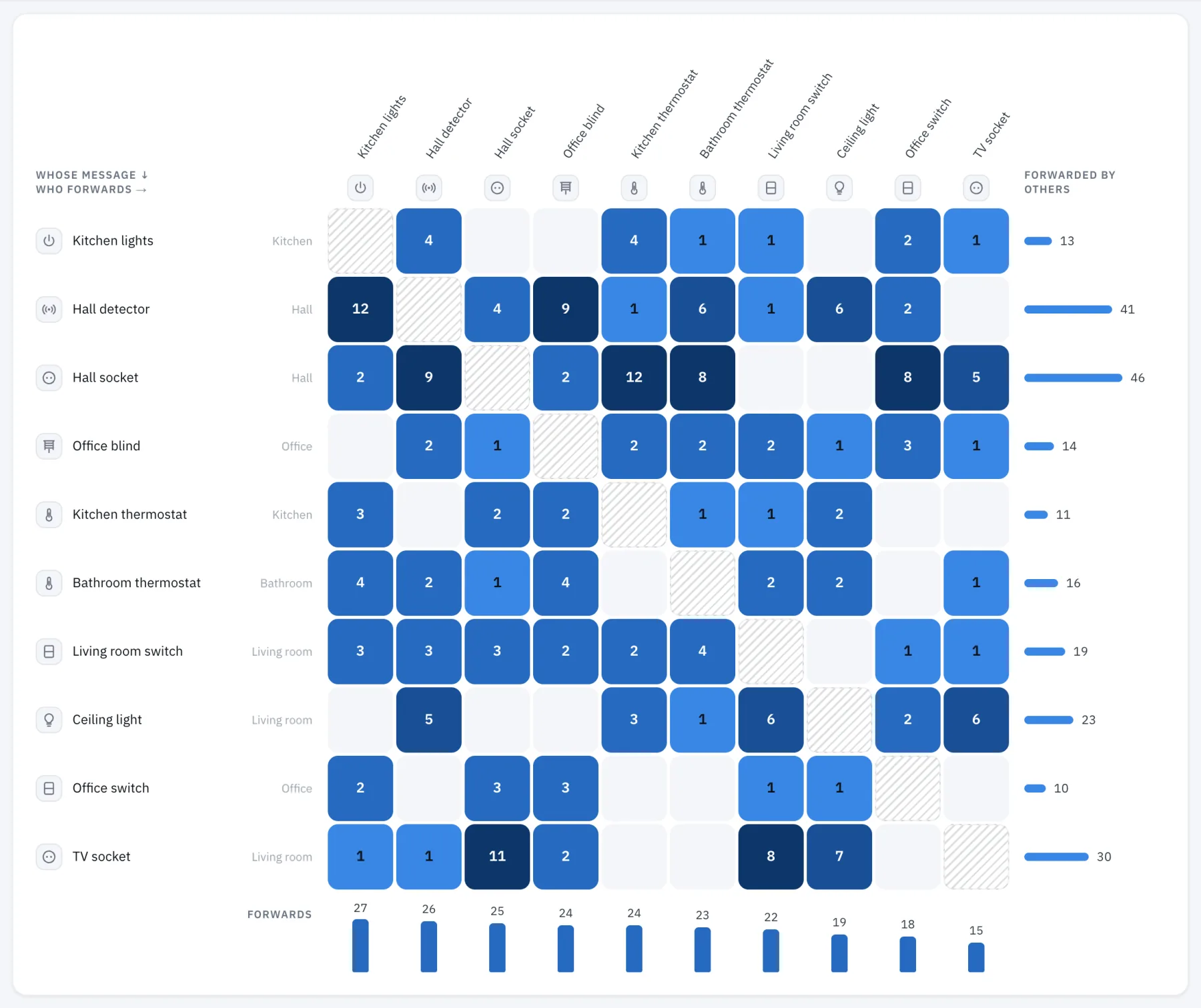
For every pair of devices, the matrix counts how often one device forwarded the messages of the other. It shows which device carries most of the forwarding and which links work in one direction only.
Totals per sender and per forwarder
Order by load or by room
Needs the sniffer stick
Optimization
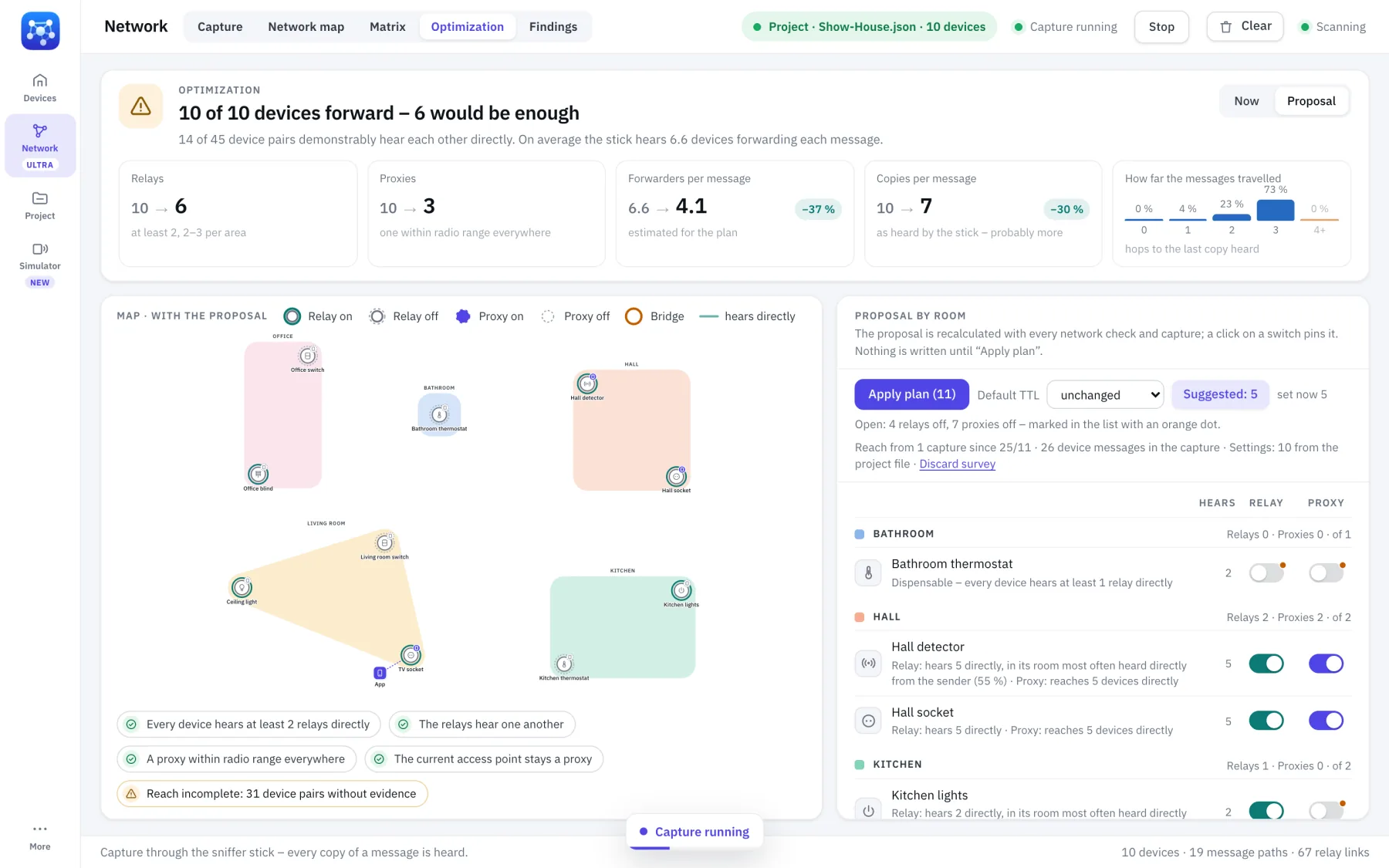
Mesh Service proposes which devices forward messages (relay) and which accept connections from the app (proxy), and recommends a TTL. “Apply plan” writes the settings to the devices, and each device confirms them. Afterwards, the page shows how the air load has changed.
Each device hears at least two relays directly
At least two relays and two proxies stay on
The app’s current access point stays a proxy
Findings
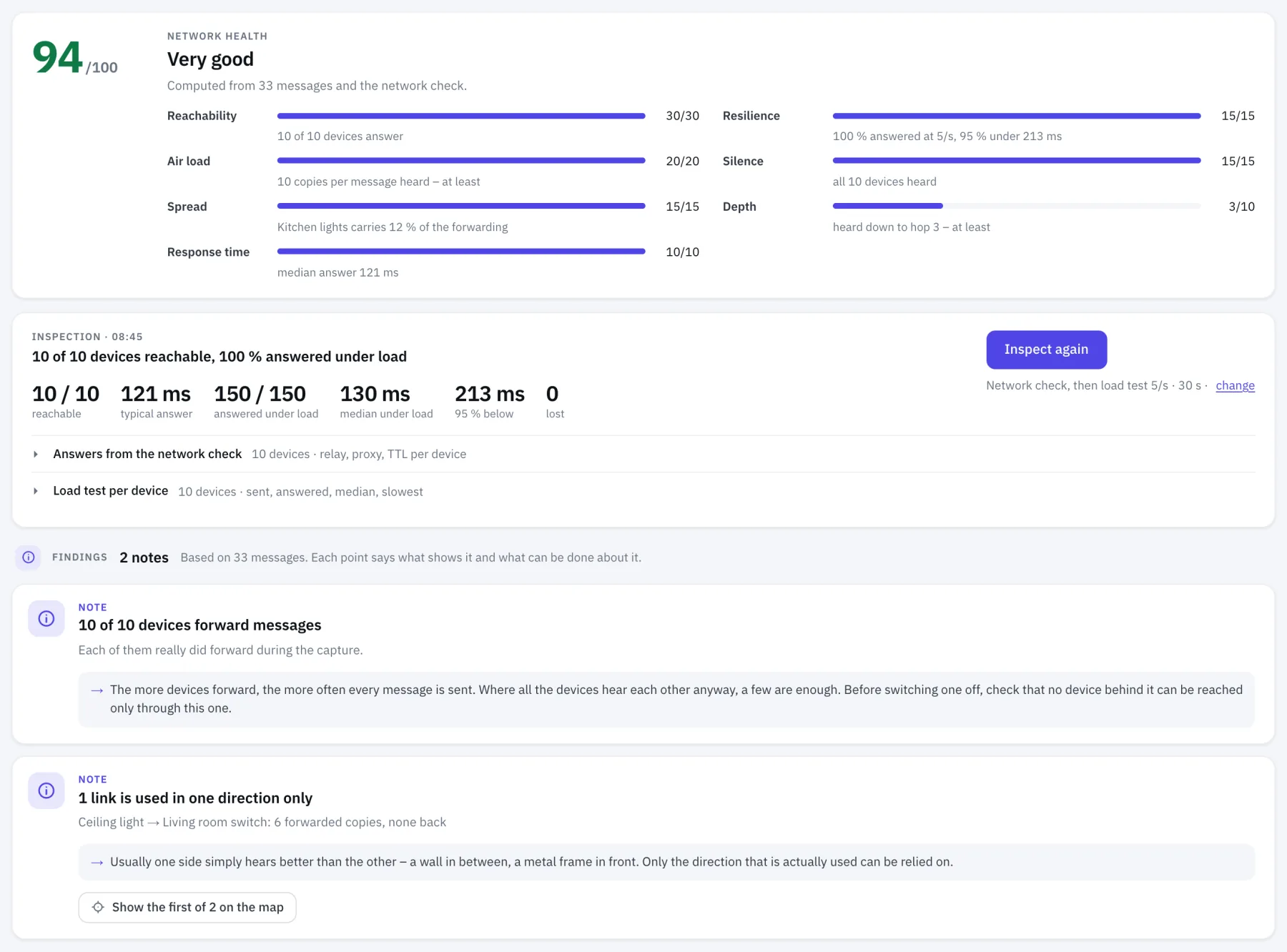
“Inspect network” queries every device and then loads the network with read requests. From these measurements and the capture, Mesh Service calculates the network health from 0 to 100. Below it are the findings, for example a device that no longer answers or a TTL that is too high, each with evidence and a recommendation.
Load test with 2, 5 or 10 requests per second
The inspection only reads and changes nothing
“Show on the map” selects the affected device on the network map
Sniffer stick, optional. A Nordic nRF52840 dongle receives all radio traffic, including repeats, forwarded copies and devices out of the computer’s range. Mesh Service flashes the sniffer firmware itself. The computer’s Bluetooth adapter stays free for inspections and parameters.
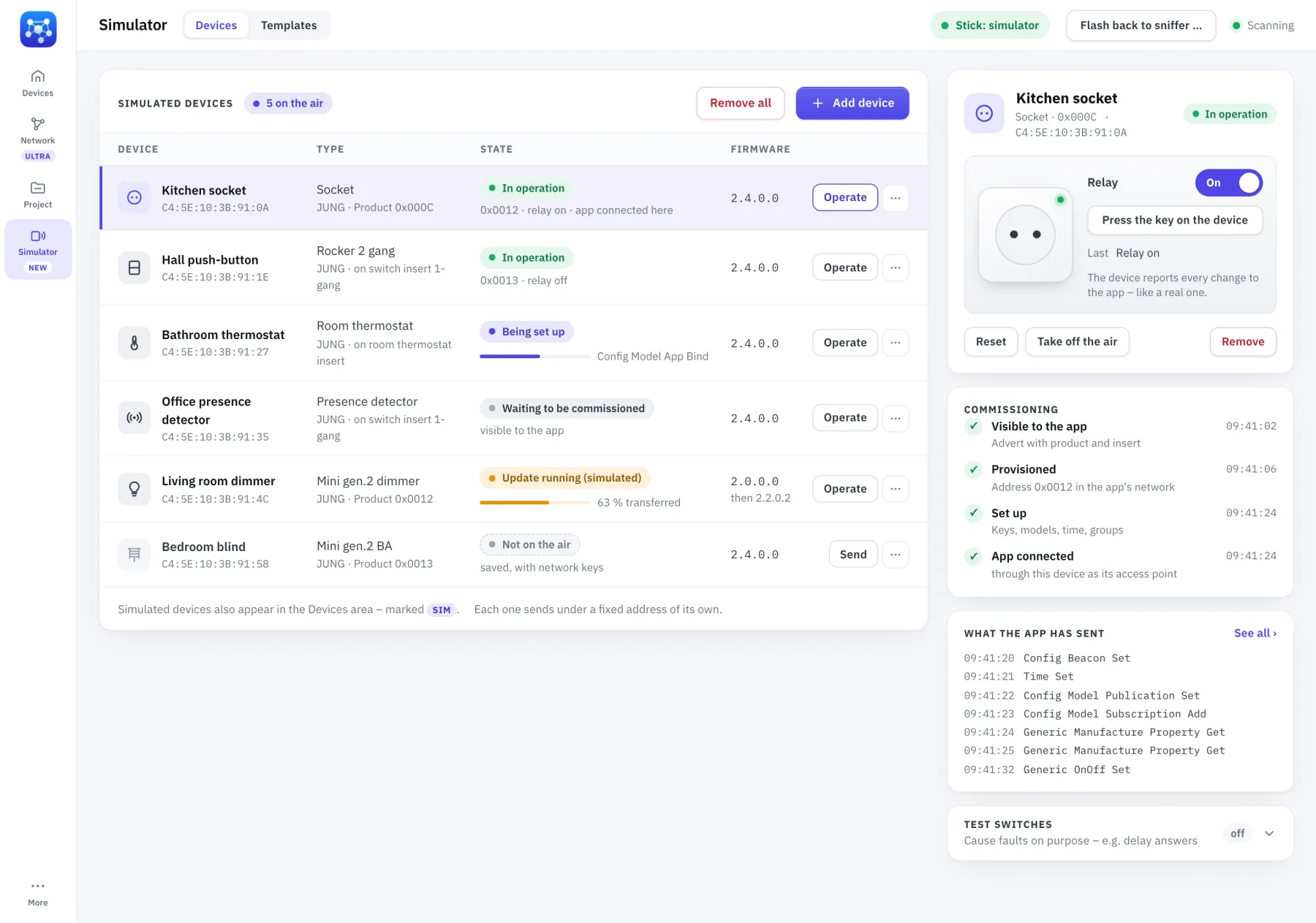
The simulator turns an nRF52840 dongle into a test installation. The dongle transmits like real JUNG HOME and Steinel devices, each with an address of its own. The JUNG HOME App finds these devices and commissions them like real ones, and so does Mesh Service. This is useful for training, demonstrations, tests with the app and reproducing support cases.
20 JUNG HOME device types, 111 Steinel products
Operation on the simulated device with button, relay, motion and brightness
A list of all messages the app has sent
Test switches to delay answers, refuse the AppKey or go silent
The devices Mesh Service knows are listed in its device catalogue. What the program can do with a device depends on the manufacturer.
JUNG HOME
Full support
Commissioning (with Ultra also with firmware from your package), resetting over the mesh, parameters as in the JUNG HOME App, report, network analysis and simulator. A run writes the JungHome.json that the JUNG HOME App imports.
214 products in the catalogue, including sensor lights, presence detectors and movement detectors. Mesh Service commissions them and writes the Steinel.json for the Steinel Connect App. It resets them to factory settings without keys and reads and writes their settings.
Devices of other manufacturers appear in the list with their company ID and the name they send. With the keys of the project, the capture decrypts their standard messages such as Generic OnOff, Level and Sensor, and their standard models can be read. Mesh Service does not commission them.
There are two editions, Pro and Ultra. A licence is valid for one year and is bound to the Computer ID of the computer. It can cover several computers. To switch from Pro to Ultra, you install a new licence file.
Pro
For commissioning and servicing installations.
€490
per computer and year · plus VAT
Commissioning of JUNG HOME and Steinel devices, up to 12 at the same time
Without a licence, the licence page opens with the Computer ID of your computer, an identifier of the form XXXX-XXXX-XXXX-XXXX.
Request a licence
“Request a licence by e-mail” opens your e-mail program with a prepared request that already contains the Computer ID.
Install the licence file
Choose the file you received or paste its content. The program then restarts.
Download and system requirements
Mesh Service comes as a ZIP file, without an installer and without further software. Without a licence, the program shows the licence page with your Computer ID after it starts.
Mesh Service can support further manufacturers. We add your Bluetooth Mesh devices in three stages, depending on what your customers need.
Recognition
Your devices appear with manufacturer and product names in the device list, the capture and the network map. For this, we need your company ID and the list of your product IDs.
Configuration and analysis
Mesh Service reads and writes the parameters of your devices and shows the messages of your models in the capture in plain text. For this, we need your parameter catalogue or a description of your models.
Commissioning
Resetting, commissioning in a run and the report, and on request firmware updates and your devices in the simulator.
Frequently asked questions
What is Mesh Service?
Mesh Service is a program for macOS and Windows for commissioning, configuring and analysing Bluetooth Mesh installations. It supports JUNG HOME and Steinel devices, commissions up to twelve devices at the same time and writes the project file for the manufacturer’s app. With the Ultra licence, it also records the radio traffic, shows the network as a map, rates it and proposes improvements. The provider is Appenetic.
Do I still need the manufacturer’s app?
Yes. Mesh Service does not replace the app. It commissions the devices and writes the project file that the app imports. The JUNG HOME App imports JungHome.json under “My project” › “Import”, and the Steinel Connect App imports Steinel.json with “Import network”. The installation is still operated with the app.
What hardware do I need?
A Mac with Apple silicon and macOS 14 or later, or a PC with Windows 10 (version 1709 or later) or Windows 11, 64-bit, with Bluetooth Low Energy. You do not need a programming adapter. Optionally, you use a Nordic nRF52840 dongle as a sniffer stick or for the simulator.
Can I take over an existing installation?
Yes, if you have the keys of the installation. Export the project in the JUNG HOME App under “My project” › “Export” and load the file with “Load project …”. Mesh Service can then reset the devices over the mesh, make them blink, configure them and analyse the network. Mesh Service resets Steinel devices even without keys, during the first ten minutes after they are switched on.
How do I reset a JUNG HOME device?
If the keys of the network are known, for example from the export of the JUNG HOME App, Mesh Service sends the device a Config Node Reset over the mesh. The JUNG HOME App does the same. This takes a few seconds, the firmware stays unchanged, and you do not need access to the device. Mesh Service reaches a device with the proxy switched off through another device in the same network. Without the keys, you reset the device with its reset button.
Does Mesh Service include firmware?
No. You bring the firmware for JUNG devices yourself, as a single file for one device (Pro) or as a firmware package for many devices (Ultra). Mesh Service checks every file for its JUNG signature and for whether it fits the firmware group of the device. Without a package, a run commissions the devices without a firmware update. There is no firmware for Steinel devices.
What happens to the keys of my installations?
They stay on your computer. The interface is a local page that the program serves itself and that can only be reached on this computer. The project file contains the keys of the installation and should not be passed on. The commissioning report contains no keys and can stay with the customer.
Does Mesh Service send data?
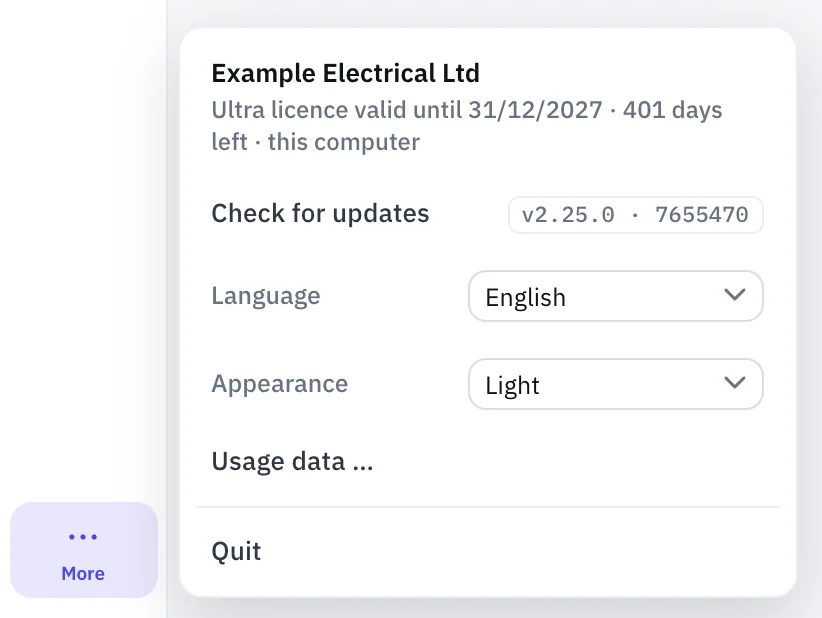
Mesh Service sends anonymous usage data until you switch this off. The data covers which features are used, how many devices of which kind a run had and how many of them were finished, as well as version, edition, language and operating system. It goes to an analytics service in the EU (Frankfurt). Names of devices, rooms, networks or customers, MAC addresses, keys, project files, captures and reports are not sent. You can switch it off under “More” › “Usage data …”.
What is the licence bound to?
To the Computer ID of your computer. A licence has a holder and an expiry date and can contain several Computer IDs. You request it by e-mail from within the program and install the file you receive. You switch from Pro to Ultra the same way.
Is there a free version?
The download is free. To work with the program, you need a Pro or Ultra licence. Without a licence, the program shows only the licence page with your Computer ID, from which you request a licence.
How does Mesh Service stay up to date?
The program checks for a new version at start-up and every six hours. One click shows the changes, downloads the package, checks signature and checksum and replaces the program. It does not install packages without a valid signature of the publisher.
Why does Windows show a warning at the first start?
The Windows version is not signed with a code signing certificate. SmartScreen therefore reports “Unknown publisher” at the first start. Click “More info” and then “Run anyway”. Download Mesh Service only from this website. The program installs updates only with a valid signature of the publisher.
Download and licence
Download the program and request the licence from within it. If you have questions, write to us.