
Recognition
Steinel devices appear in the list with their name and the product name from the catalogue. Mesh Service remembers recognised devices, including those that send their name only rarely.
Supported devices
The catalogue of Mesh Service knows 214 Steinel products. Mesh Service commissions them over Bluetooth Mesh, resets them to factory settings without keys and writes the project file for the Steinel Connect App.
Mesh Service is a product of Appenetic. STEINEL is a trademark of STEINEL GmbH and is mentioned here to describe the supported devices.
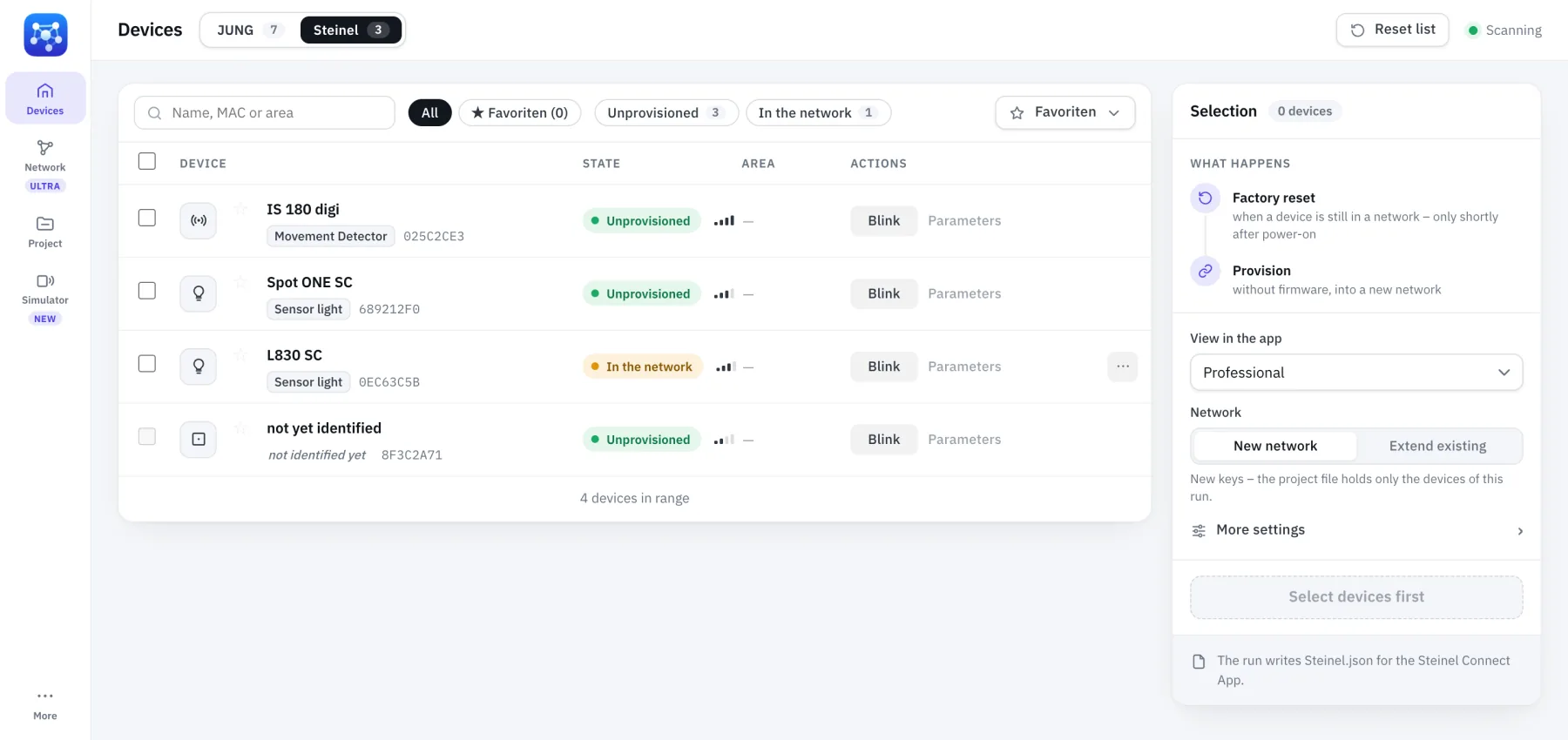
Steinel devices appear in the list with their name and the product name from the catalogue. Mesh Service remembers recognised devices, including those that send their name only rarely.
A run sends the devices what the Steinel Connect App sends when it adds them, insofar as it is part of the mesh standard. It writes the Steinel.json for the “Professional” or “Home” view.
Through a service of the manufacturer, during the first ten minutes after switching on. Automatically in a run, or individually with “Factory reset …”.
Through the same service, a Steinel device blinks even when the keys of its network are missing.
The Bluetooth SIG standard models and the properties of Steinel’s own vendor models, with the names from the Steinel Connect App.
The commissioning report is also available after a Steinel run. The simulator knows 111 Steinel products.
The Steinel Connect App adds a network to one of its two views, “Professional” or “Home”. Before the run, you choose under “View in the app” which view the file is written for. After the run, the column on the right lists the following steps.
Steinel.json with “Import network” in the matching view.If a Steinel device still belongs to a network, the run resets it to factory settings through the manufacturer’s service, even when it knows the keys. Unprovisioned devices stay as they are.
A Steinel device accepts the factory reset only during the first ten minutes after it is switched on. Shortly before the run, switch devices that still belong to a network off and on again.
For Steinel devices, the device list shows the product kind in the manufacturer’s words, for example “Movement Detector”. If the catalogue does not know a product, the message line names the device, and it is missing from the Steinel.json.
Mesh Service has no firmware for Steinel devices. A run commissions them without a firmware update.
| Product kind in the catalogue | Products |
|---|---|
| Sensor light | 99 |
| Presence Detector | 57 |
| Movement Detector | 16 |
| Outdoor light | 14 |
| Indoor light | 11 |
| Gateway | 3 |
| Sensor lamp | 3 |
| Smart Space Sensor | 3 |
| Twilight switch | 2 |
| Bluetooth Relay, Human Presence Detector, Light control, Presence Switch, Pushbutton Coupler, Time sensor | 1 each |
Often the device still belongs to another network. The device list of Mesh Service shows whether a device is “Unprovisioned” or “In the network”. Mesh Service resets it to factory settings without keys, during the first ten minutes after it is switched on. Also delete older networks with this device in the app, otherwise the app does not show it in the imported network.
Yes. Mesh Service commissions the devices and writes the Steinel.json. The Steinel Connect App imports this file, and you operate the installation with it.
No. Mesh Service has no firmware for Steinel devices. A run commissions them without a firmware update.
214 products, including sensor lights, presence and movement detectors, indoor and outdoor lights, sensor lamps, twilight switches and gateways. The table on this page shows the product kinds.
Switch the device off and on again. During the following ten minutes, Mesh Service resets it to factory settings through the manufacturer’s service, individually with “Factory reset …” in the row or automatically in a run. The keys of the network are not needed.
Download the program and request the licence from within it. If you have questions, write to us.